Gaither TV1.6
Publisher Description
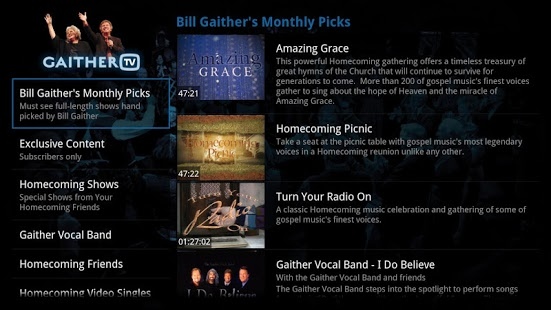
Welcome to GaitherTV!
We truly believe that there is nothing quite like GaitherTV and we are thrilled that you are a part of our Homecoming family.
With instant access to our full video library of television specials combined with exclusive concert footage, special presentations and even full-length DVD selections hand-picked each month by Bill Gaither himself, you'll quickly see that you are part of something very special with GaitherTV.
In addition to all the great content that will now be available in your home each month via connected TV devices such as Roku and GoogleTV, you can literally take GaitherTV with you on the go as it can easily be enjoyed on your laptop, tablet or smartphone. That's right, one-subscription; all-screens! It doesn't get any better than that.
If you have any questions about your GaitherTV subscription, our customer service team stands ready to help. Email customerservice@gaithermusic.com or call 1-800-713-3773 during business hours (8:30 a.m. - 5:00 p.m. Eastern Time).
We hope you incredibly enjoy your subscription to GaitherTV!
Blessings,
Your Gaither.TV Team
About Gaither TV
The company that develops Gaither TV is Imavex. The latest version released by its developer is 1.6. This app was rated by 1 users of our site and has an average rating of 4.0.
To install Gaither TV on your Android device, just click the green Continue To App button above to start the installation process. The app is listed on our website since 2015-02-12 and was downloaded 56 times. We have already checked if the download link is safe, however for your own protection we recommend that you scan the downloaded app with your antivirus. Your antivirus may detect the Gaither TV as malware as malware if the download link to tv.gaither.gtv is broken.
How to install Gaither TV on your Android device:
- Click on the Continue To App button on our website. This will redirect you to Google Play.
- Once the Gaither TV is shown in the Google Play listing of your Android device, you can start its download and installation. Tap on the Install button located below the search bar and to the right of the app icon.
- A pop-up window with the permissions required by Gaither TV will be shown. Click on Accept to continue the process.
- Gaither TV will be downloaded onto your device, displaying a progress. Once the download completes, the installation will start and you'll get a notification after the installation is finished.
Program Details
System requirements
Download information
Pricing
Version History
version 1.6
posted on 2015-02-12
Fix for Android Lollipop upgrades
version 1.1
posted on 2013-03-01
Several fixes and updates
